Wenzhou AIOU Optical Communication Co., Ltd.



Leave Your Message
-
 Get Your Quote
-
 Email
Picking the right SFP LC module isn’t just about what's on the box; it really depends on what your network's actually doing out in the field. I mean, that same LC connector can be used for different distances, wavelengths, and fiber types — it’s not a one-size-fits-all deal. For example, a 10G link inside a data center needs different optics than the same speed connection bridging two separate buildings. When it comes to fiber, distance really changes everything.
Jim Hayes, who founded The Fiber Optic Association, gives some solid advice: ‘Know what the link needs to do before you pick the component.’ Honestly, that simple tip keeps you focused on what really matters. So, before you go shopping, double-check the switch port speed, whether you’re using single-mode or multimode fiber, the transmission wavelength, the maximum reach, and the operating temperature. Then, don’t forget to verify connector polarity and whether it’s duplex or not — those details can make or break your setup.
And, of course, a reliable SFP LC module should play nice with your equipment’s compatibility requirements. Brands like Cisco, Juniper, or Arista might have their own little coding quirks. Digital diagnostics can be a lifesaver here — they help you see temperature, voltage, and optical power levels, catching small issues before they turn into big outages. Oh, and check things like insertion loss and receiver sensitivity too — those labels can be a bit misleading.
Now, if you’re thinking about optical modules versus copper options, it’s worth noting that an SFP RJ45 module can handle twisted-pair cabling, but it comes with different limitations on distance, heat, and power use. Sometimes, going for the cheaper option might seem tempting, but it can end up costing more later on — things like reliability and future-proofing matter.
In real-world setups, things are rarely perfect — fiber records might be outdated, and old patch panels can cause unexpected losses. So, when you’re choosing hardware, it’s a good idea to test everything, keep good documentation, and add a safety margin. Don’t forget, even a short link can fail if connectors are dirty or if polarity is reversed. The ideal choice isn’t just about matching specs; it needs to be measurable, serviceable, and ready for whatever you’ve got coming next.
Hope that helps make sense of it all. Picking the right module isn’t just a technical decision — it’s about really understanding your network’s needs and planning ahead.
How to Choose the Best SFP LC Module?
An SFP LC module uses the Small Form-factor Pluggable MSA design. It is hot-swappable and typically connects through a duplex LC interface. The form factor is only the starting point. IEEE 802.3-2022 defines 1000BASE-X at 1.25 Gb/s and 10GBASE-R at 10.3125 Gb/s. These figures explain the practical 1.25–10.3 Gb/s range. SFP usually serves Gigabit links, while SFP+ commonly supports 10-Gigabit transmission.
Choose the module by matching speed, wavelength, fiber type, and reach. Multimode fiber suits short links inside equipment rooms. Single-mode fiber supports longer paths, often from 10 to 80 kilometers. Those distances depend on optical budget, connectors, and cable quality. SFF-8472 specifies digital optical monitoring, including temperature, voltage, and transmit power. It is useful, but monitoring does not repair a poor fiber connection.
The 2024 Ethernet Alliance Ethernet Roadmap shows 10-Gigabit Ethernet remaining relevant beside faster 25, 100, and 400-Gb/s systems. That matters when upgrading gradually. A low-cost module may meet the rate but fail temperature or interoperability checks. I once treated identical LC labels as proof of compatibility. That shortcut was wrong. Check the host port, operating temperature, DOM support, and tested reach before ordering. A datasheet can still hide a mismatch.
Compare common LC duplex optical module configurations by data rate, wavelength, fiber type, transmission distance, and operating requirements.
| Module Category | Nominal Data Rate | Optical Wavelength | Fiber Type | Typical Reach | Connector | Common Application | Selection Notes |
|---|---|---|---|---|---|---|---|
| Gigabit Multimode Short Reach | 1.25 Gb/s | 850 nm | OM2, OM3, or OM4 multimode fiber | Up to 550 m on OM2/OM3/OM4, depending on link conditions | Duplex LC | Short-distance data-center and campus links | Choose this option for low-cost links over existing multimode cabling. |
| Gigabit Single-Mode Standard Reach | 1.25 Gb/s | 1310 nm | Single-mode fiber | Up to 10 km | Duplex LC | Building-to-building and metropolitan access links | A practical choice when the link exceeds multimode distance limits. |
| 10 Gigabit Multimode Short Reach | 10.3 Gb/s maximum class | 850 nm | OM3 or OM4 multimode fiber | Up to 300 m on OM3; up to 400 m on OM4 | Duplex LC | Server rooms and data-center switch uplinks | Verify the installed fiber grade and maximum channel length before selecting. |
| 10 Gigabit Single-Mode Long Reach | 10.3 Gb/s maximum class | 1310 nm | Single-mode fiber | Up to 10 km | Duplex LC | Campus, metro, and extended inter-building connections | Use single-mode cabling and confirm the host port supports the required 10 Gb/s interface. |
| 10 Gigabit Single-Mode Extended Reach | 10.3 Gb/s maximum class | 1550 nm | Single-mode fiber | Up to approximately 40 km, subject to optical budget | Duplex LC | Long-distance metro and service-provider access links | Check dispersion, attenuation, connector loss, and the complete link budget. |
| Bidirectional Single-Fiber Option | 1.25 Gb/s or 10.3 Gb/s class | Paired wavelengths, commonly 1310/1490 nm or 1270/1330 nm | Single-mode fiber | Typically 10 km or more, depending on the optical design | Simplex LC | Fiber-constrained access and point-to-point links | The two ends must use complementary transmit and receive wavelengths. |
| MSA Mechanical Profile | Applicable to SFP/SFP+ host interfaces | Not applicable | Not applicable | Not applicable | LC or other supported interface | Switches, routers, storage systems, and optical transport equipment | The common SFP form factor is approximately 56.5 × 13.4 × 8.5 mm; confirm host compatibility, coding, power, and temperature requirements. |
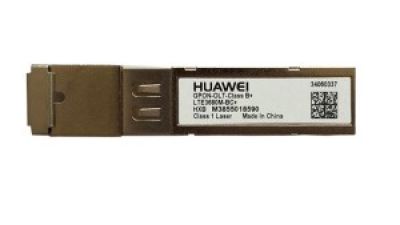
Choosing the right GPON OLT SFP B+ module is essential for building a reliable FTTH fiber network. Start by checking compatibility with the OLT platform, including the SFP form factor, GPON standards, management functions, and optical interface. The B+ class typically supports a downstream wavelength of 1490 nm and an upstream wavelength of 1310 nm, with a transmission reach commonly suitable for access networks up to 20 km, depending on fiber quality, splitter ratio, and connection loss. Confirm that the module’s optical power and receiver sensitivity match the planned network design.
A high-performance GPON OLT B+ optical module should provide stable high-speed transmission, consistent optical output, and dependable operation under continuous traffic. Important factors include low power consumption, a suitable operating temperature range, digital monitoring capability, and reliable interoperability with optical network terminals. It is also advisable to evaluate the required split ratio and link budget before installation, as excessive attenuation can reduce service stability. For telecom operators, internet service providers, and enterprise access systems, selecting a properly matched module helps support efficient fiber deployment, predictable maintenance, and long-term communication performance.
It is a hot-swappable optical module using the Small Form-factor Pluggable design. It usually connects through a duplex LC interface.
SFP modules commonly support Gigabit links around 1.25 Gb/s. SFP+ modules commonly support 10-Gigabit transmission up to 10.3125 Gb/s. Check the host port.
Multimode fiber suits short equipment-room and data-center connections. An 850 nm module commonly supports these links. Typical 10G reaches include 300 meters on OM3 and 400 meters on OM4.
Choose single-mode fiber for campus, telecom, or inter-building connections. 1310 nm modules commonly reach about 10 kilometers. Some 1550 nm modules support longer spans, but conditions matter.
Match the module’s speed, wavelength, fiber type, LC polarity, and expected reach. Do not judge by connector appearance alone. Multimode and single-mode cables can look nearly identical.
Subtract receiver sensitivity from minimum transmit power. For example, -3 dBm transmit power and -18 dBm sensitivity provide 15 dB. Cable, connectors, patch panels, and aging consume that margin.
Duplex LC uses separate fibers for transmission and reception. Incorrect polarity can prevent the link from working. Dust can increase insertion loss.Clean the connector ends.
Digital monitoring can report temperature, voltage, and transmit power. It cannot repair a dirty connector or poor fiber connection. Use measurements, not assumptions.
Check the switch port, operating temperature, DOM support, wavelength, and tested reach. Confirm receiver sensitivity and connector polarity. A low-cost module may still fail interoperability checks.
Patch-panel changes may introduce loss or reverse polarity. Cable quality and connector condition can also change results. I once trusted identical LC labels. That shortcut was wrong.
Choosing the right Sfp Lc Module requires careful consideration of network requirements and installation conditions. First, confirm its SFP MSA form factor and supported data rate, typically ranging from 1.25 to 10.3 Gb/s. Match the module to the fiber type: 850 nm is generally used for multimode fiber, while 1310 nm or 1550 nm is suitable for single-mode fiber. Transmission distance is also important, with typical reaches of 300 meters at 850 nm, 10 kilometers at 1310 nm, and up to 80 kilometers at 1550 nm.
Before purchasing, verify compliance with IEEE 802.3 Ethernet standards and equipment compatibility. Review the LC duplex interface, wavelength, transmit power, receiver sensitivity, and available fiber budget to ensure stable performance. Select a commercial temperature range of 0–70°C for standard environments or an industrial range of −40–85°C for harsher locations. Finally, check DOM monitoring, coding requirements, and switch compatibility to support reliable installation, maintenance, and long-term network operation.